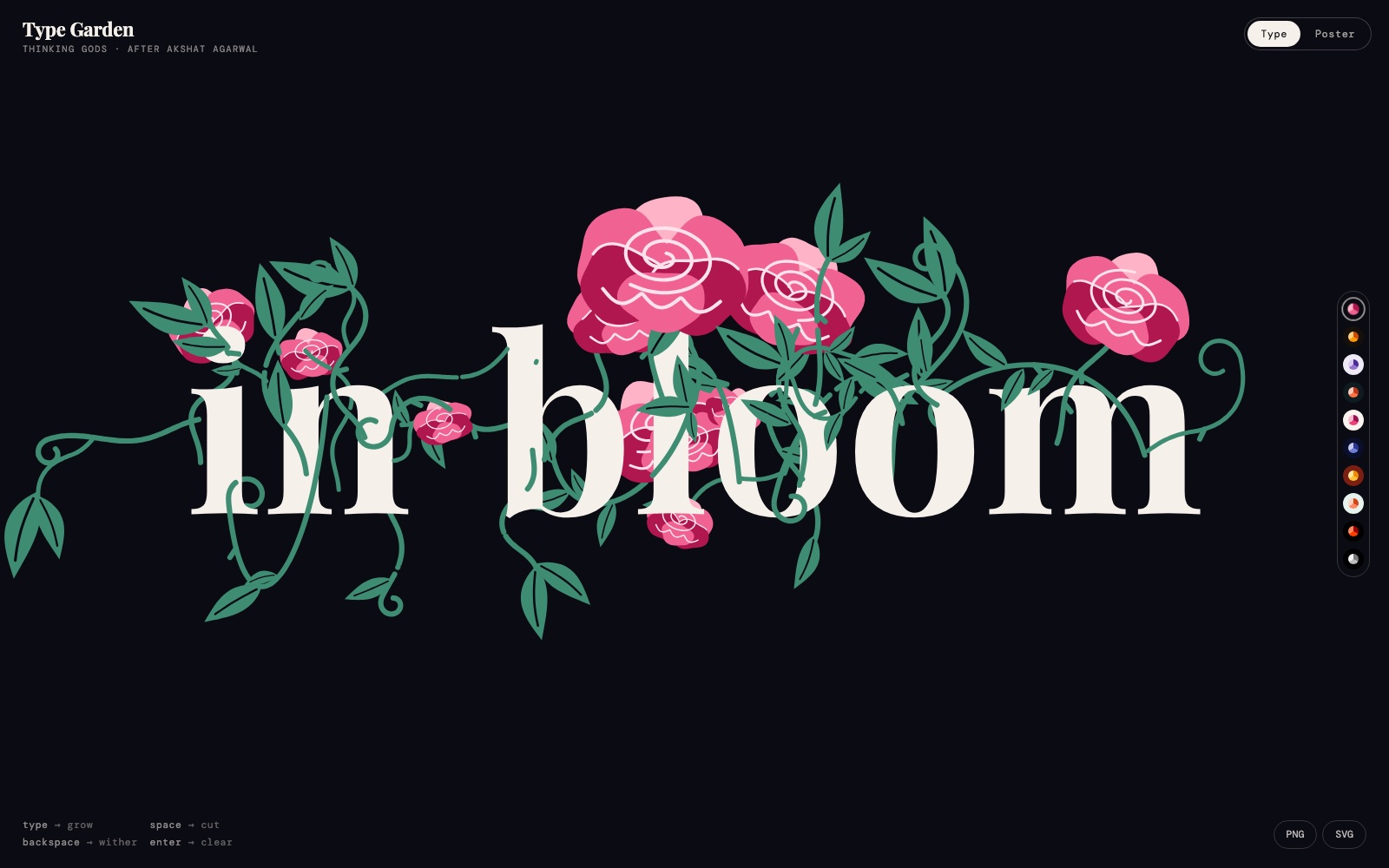
Most generative type effects decorate a word from the outside — a texture over it, particles around it. This one grows out of it. The stem is rooted on the baseline under each character and the roses are placed on the glyph's own curve, so the garden fits the word instead of sitting on top of it.
Nothing to attach. One self-contained HTML file, no libraries, no build step — only two Google Fonts. Type in the live build ↗ first, then take the prompt.
The prompt
Paste this into Claude and open the file it gives you. Click the canvas and start typing.
Build a single self-contained HTML page — one index.html with all CSS and JS inline, no frameworks, no build step, no libraries — called TYPE GARDEN.

It is a full-screen canvas where typing grows a flower garden out of the letters. Every character the visitor types is drawn as a serif glyph with a stem, leaves and roses growing over and behind it, so a typed word reads as a word and as a hand-drawn botanical illustration at the same time.

THE CORE IDEA, and the reason it works: the letters are real text rendered to a canvas, and the plants are generated from each glyph's own outline. A stem is rooted at the baseline under the character, and the flowers are placed on the glyph's curve, so the garden fits the word rather than sitting on top of it. Nothing is a static image.

CANVAS AND SETUP
- One <canvas> at position:absolute, inset:0, sized to innerWidth x innerHeight times devicePixelRatio, capped at 2. Reset the transform with setTransform on every resize
- A hidden <input> fixed at 1px x 1px, opacity 0, caret-color transparent, font-size 16px (anything smaller makes iOS zoom). This is what actually receives the typing; the canvas never has focus. Keep a zero-width space (U+200B) in it permanently as a sentinel so backspace at position zero still fires an input event
- Read typing from the input event, not keydown: diff the field's value against the last value you stored, count the characters removed, and add the characters appended. That handles autocorrect, IME composition and paste for free, where keydown does not
- Font: Playfair Display 700 for the glyphs, DM Mono 400/500 for the interface, both from Google Fonts. Wait for document.fonts.ready before the first layout or the measurements will be wrong

HOW ONE LETTER GROWS Each typed character becomes an object with a birth time, a seed derived from its index, and a death time that starts null.
- Measure the glyph with the canvas 2D context, then lay the whole line out centred on screen, wrapping to a second line when it runs past 86% of the viewport width
- Growth is a function of elapsed time, not of frames: progress = clamp((now - born) / 900, 0, 1), eased with an overshoot curve so the bloom arrives with a small bounce. A 30fps phone and a 120Hz laptop must land on the same frame at the same moment
- The stem is a quadratic curve from the baseline to a point on the glyph, drawn with a stroke that thins toward the tip. Leaves are two mirrored teardrops on alternating sides, each appearing at its own fraction of the stem's progress
- A rose is three concentric bands of petals — outer rim, mid, heart — each an irregular ellipse with a wobbled edge, drawn back to front so the heart sits on top. Add a single spiral line over the heart in the flower-line colour. Jitter every radius and angle from the letter's seed so no two roses repeat
- Draw order per letter: stems and leaves behind the glyph, the glyph, then the front flowers. That overlap is what makes it read as a garden rather than a decorated font

THE FOUR KEYS
- Any character: grows a new plant
- Space: cuts the stem of the previous letter, so the garden breaks into separate clumps rather than one continuous hedge
- Backspace: withers, it does not delete. The plant browns, droops and shrinks over about 700ms, then is removed
- Enter: clears the whole garden

TEN PALETTES, as a table of [name, background, [petal outer, petal mid, petal heart], stem and leaf, flower line, type colour]: Dusk        #0B0B12  #FFB3C7 #F06292 #B0174F  #3E8C72  #FFE3EC  #F5F0EA Marigold    #15110A  #FFD180 #FF9800 #D24A00  #6A9A2E  #FFF3D6  #FFF8EC Lavender    #EFEBF6  #D9CCF0 #9575CD #4B2A9B  #2E5E4E  #F6F1FF  #1B1530 Coral reef  #0E1C1F  #FFCCBC #FF7043 #C2361A  #4DB6AC  #FFF1EA  #FFFFFF Peony       #FBF3EE  #F8BBD0 #EC407A #9C0F4E  #1F5F2A  #FFF0F5  #151515 Indigo      #0A0F2C  #C5CAE9 #6F7FD6 #2A3596  #8BC34A  #EEF0FF  #FFFFFF Saffron     #7A1F12  #FFE7A3 #FFC233 #F08A00  #F3D9B1  #7A1F12  #FFF4E0 Mint        #E6F2EC  #FFD3C2 #FF8A65 #D84315  #2F7D5B  #FFF6F1  #0F2A20 Ember       #000000  #FF8A5B #FF3D00 #9E0000  #3257FF  #FFD3C2  #FFFFFF Mono        #000000  #F5F5F5 #BDBDBD #7A7A7A  #5A5A5A  #111111  #FFFFFF Show them as a vertical rail of small round swatches on the right edge, each a pie of its own three petal colours. The background transitions over 350ms when one is picked.

SEVEN LOOPING PRESETS, selectable, each a named animation over the finished word: Breathe        slow sway, 3s Grow & wither  bloom, then back, 6s Typed          type in, cut, repeat, 5s Gust           wind sweeps left to right, 4s Reach          stems bend toward a moving light, 6s Scatter        random bloom and fade, 6s Visitor        a butterfly drops in and leaves, 7s

TWO MODES, switched by a pill toggle top right:
- Type: the live canvas, typing goes straight in
- Poster: a fixed-ratio composition of the current text with the preset running on a loop, plus PNG and SVG export buttons bottom right. Export at 2x

CHROME
- Top left: the title in the serif, and one line of mono credit beneath it at 9px, letter-spacing .14em, uppercase
- Bottom left, mono 10px at 45% opacity, two lines: type -> grow        space -> cut backspace -> wither  enter -> clear
- Nothing else. No panels, no sliders, no instructions modal

TOUCH AND MOBILE Set a data-touch flag on <html> from a pointer query. On touch, give #app touch-action:none, drive the height from visualViewport so the on-screen keyboard does not crop the canvas, and tap anywhere to focus the hidden input. Never let the page scroll or rubber-band: overflow hidden, overscroll-behavior none.

PERFORMANCE One requestAnimationFrame loop, one clearRect, no per-frame allocation inside the draw path. Cache each letter's glyph path and its flower geometry on first draw and reuse it. Pause the loop when document.hidden. Under prefers-reduced-motion, skip the growth animation and the presets entirely and draw the finished garden immediately.

Give me the finished index.html and tell me the one line to change to swap the serif, and the one line to add a palette.
Three decisions carry this build. Typing is read from the input event rather than keydown, which gets autocorrect, IME and paste for free. Growth is interpolated on elapsed time, so a 30fps phone and a 120Hz laptop land the bloom at the same moment. And backspace withers rather than deletes — the plant browns and droops over 700ms, which is the detail everyone remembers.
Make it yours
Four swaps and it stops being a flower garden:
- The plant. The rose is three bands of wobbled ellipses plus a spiral. Swap it for a fern (one curve, paired fronds), a firework (radial lines with a fade) or a circuit (right angles only, no curves). The stem and placement code does not change

- The serif. Playfair has deep bowls that give the stems somewhere to sit. Any high-contrast display serif works; a geometric sans does not, because the flowers have nothing to grow against

- The palette. Ten are in the prompt as a table. The rule is three petal tones from light to dark, one green, one line colour, one type colour

- The word. 'in bloom' is the default. Anything up to about fourteen characters stays on one line at desktop width
Re-run the prompt with your changes rather than editing the output by hand — the growth timings and the draw order stay consistent that way.