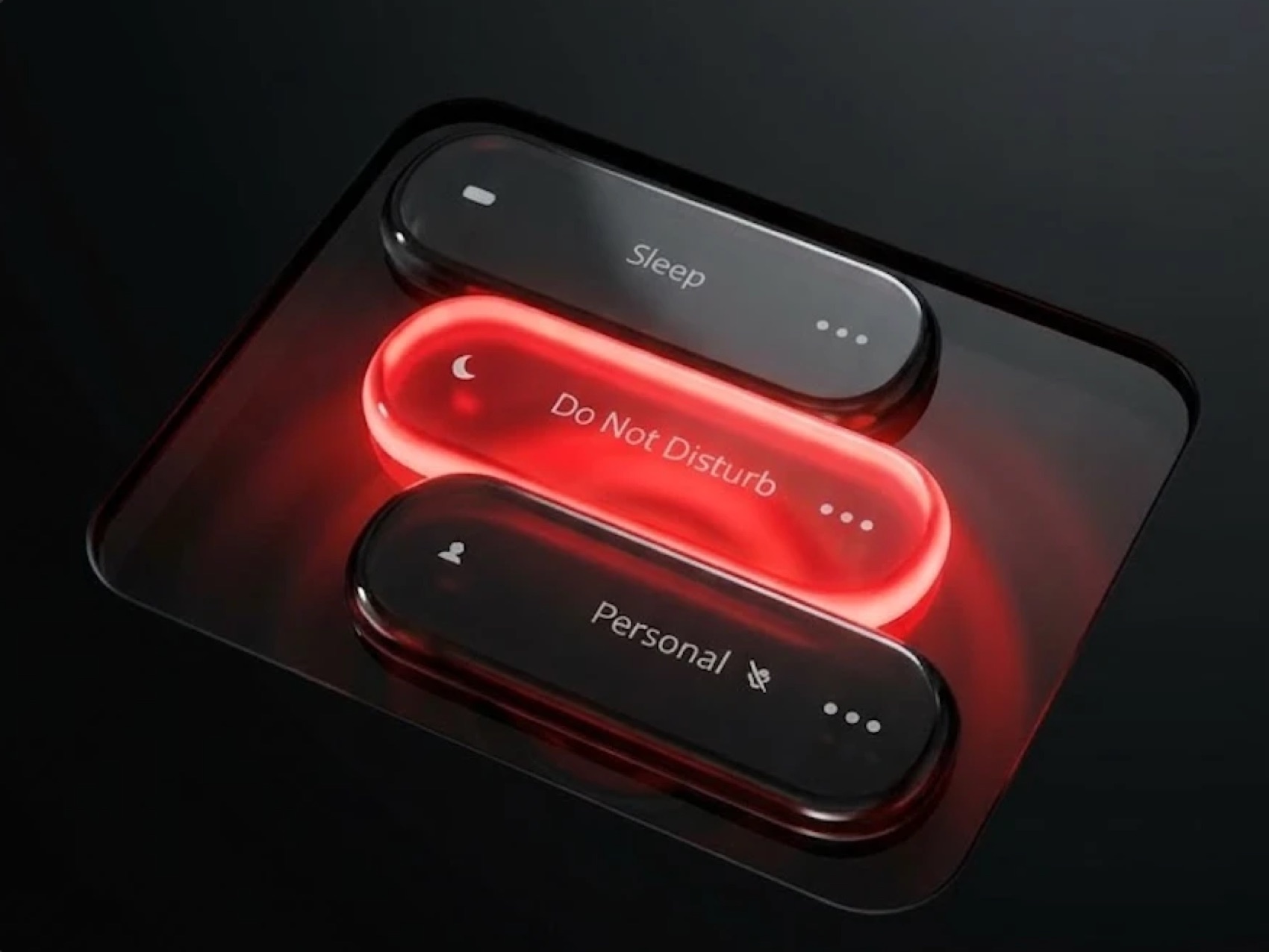
Three glass buttons. Hover and one lifts. Click and it slams down, the base ripples like water, and the button flips all the way over — coming up in a new colour while the whole scene changes with it.
- Try it right now ↗
That link is the whole thing, running. Nothing to install. Works on any computer.
- Source on GitHub ↗
MIT licensed — free for personal or commercial work. No credit required, though it's always appreciated.
Get it running on your computer
You don't need to know how to code. Let an AI do the setup. Open Claude, ChatGPT or Cursor — anything that can run commands on your computer — and paste this in:
Set up this project on my computer and run it: https://github.com/kunal-chaudhary-design/liquid-buttons

I'm not a developer, so please:
- install anything I'm missing (like Node.js)
- put the project on my Desktop
- start it and open it in my browser
- tell me the one command to start it again next time

If something fails, fix it and keep going. Explain in plain language.
Change the colours
The fun part, and you don't need to code for this either. Just ask the AI:
In this project, change the Sleep button to hot pink and the Personal button to mint green.
Or do it by hand — open src/main.ts in any text editor and find this near the top:
const BUTTONS = [
  { label: 'Sleep',          color: 0x69a5ec, ... },
  { label: 'Do Not Disturb', color: 0xee2b2b, ... },
  { label: 'Personal',       color: 0xed9334, ... },
];
0x69a5ec is a normal hex colour with 0x instead of #. So #ff00aa becomes 0xff00aa. Change it, save the file, and your browser updates instantly. You can change label to any text you like too.
Other things to try
| Change this | To do this |
|---|---|
| HOVER_LIFT | How high a button rises on hover |
| RIPPLE_AMP | How big the water ripple is |
| FLIP_TIME | How fast the button flips over |
| GLOW_INTENSITY | How much colour spills onto the base |
Recording it
Press H to hide the controls, leaving only the buttons on a clean background. Then screen record. Make your browser window tall and narrow first if you want a vertical video.
If something goes wrong
Paste the error into the same AI chat and ask it to fix it. That's genuinely the fastest route — it can see what went wrong and repair it.
Prefer the terminal?
Install Node from nodejs.org (one time only), open Terminal, then paste these one at a time:
cd ~/Desktop && git clone https://github.com/kunal-chaudhary-design/liquid-buttons.git
cd liquid-buttons
npm install
npm run dev
The terminal prints a link like http://localhost:5173. Cmd-click to open it. To stop: Ctrl + C. To get updates later: git pull && npm install.